Wednesday, April 10, 2019

Who is Stealing Your CPU Cycles?

Recently we noticed one of virtual server on Linode performing poorer than what we would expect to. On further investigation, we noticed abnormally high steal (st) time cpu percentage. It was ranging as high 40%. Some examples from top command is below.

top - 11:46:24 up 4 days, 23:07, 1 user, load average: 2.70, 1.51, 0.98
Tasks: 114 total, 3 running, 66 sleeping, 0 stopped, 0 zombie
%Cpu(s): 7.9 us, 5.0 sy, 0.0 ni, 36.6 id, 17.8 wa, 0.0 hi, 0.6 si, 32.3 st
KiB Mem : 4039472 total, 117044 free, 1708724 used, 2213704 buff/cache
KiB Swap: 524284 total, 523760 free, 524 used. 2074000 avail Mem

top - 11:46:36 up 4 days, 23:07, 1 user, load average: 2.36, 1.47, 0.97
Tasks: 114 total, 1 running, 67 sleeping, 0 stopped, 0 zombie
%Cpu(s): 8.5 us, 3.2 sy, 0.0 ni, 33.4 id, 19.6 wa, 0.0 hi, 0.4 si, 34.9 st
KiB Mem : 4039472 total, 115956 free, 1708536 used, 2214980 buff/cache
KiB Swap: 524284 total, 523760 free, 524 used. 2074200 avail Mem

top - 11:46:39 up 4 days, 23:07, 1 user, load average: 2.49, 1.52, 0.99
Tasks: 114 total, 1 running, 67 sleeping, 0 stopped, 0 zombie
%Cpu(s): 8.1 us, 4.4 sy, 0.0 ni, 25.9 id, 25.1 wa, 0.0 hi, 0.7 si, 35.8 st
KiB Mem : 4039472 total, 115944 free, 1708304 used, 2215224 buff/cache
KiB Swap: 524284 total, 523760 free, 524 used. 2074428 avail Mem

top - 11:46:49 up 4 days, 23:08, 1 user, load average: 2.75, 1.60, 1.02
Tasks: 114 total, 2 running, 67 sleeping, 0 stopped, 0 zombie
%Cpu(s): 7.2 us, 5.2 sy, 0.0 ni, 26.5 id, 20.5 wa, 0.0 hi, 0.6 si, 39.9 st
KiB Mem : 4039472 total, 115008 free, 1708524 used, 2215940 buff/cache
KiB Swap: 524284 total, 523760 free, 524 used. 2074200 avail Mem


We logged ticket with Linode support. They migrated this virtual server to another physical server. And server performance was as expected after that.

So, what is steal time cpu metric? 
Steal time is percentage of time virtual cpu of your virtual server is waiting for real cpu of physical server when virtualization is actually busy serving somebody else. Virtualization doesn't divide cpu exactly between various virtual servers as it divides memory or some other resources. So, possibly another virtual server is consuming more cpu cycles than it's share. So, your virtual server is not getting enough of it's share. 

We checked if any other virtual server has same issue. And we found one more. Linode support migrated that server too to another physical server. Following graph shows improvement of server before and after migration to newer physical server.


Performace improvement after cpu steal is fixed

Friday, March 22, 2019

Mysql and Mysql Slave Monitoring Zabbix Template

Most of available mysql monitoring template uses one user parameter per item. To collect values for 10 items, they will run 10 mysql command (or same command 10 times and get extract desired information from result). These monitoring templates instead get complete result in one item as json content and then uses dependent items to create multiple items on zabbix server

Github links:


Installation

  1. Zabbix client (mysql slave server) host must have jq installed. If not, please install using
  2. sudo apt install jq
  3. Add following line in zabbix client configuration. Mysql credentials are stored in /etc/zabbix/.my.cnf for me. Make sure zabbix user has read access to mysql password file

    • Myql Template
      UserParameter=Mysql.Server-Status, mysql --defaults-file=/etc/zabbix/.my.cnf --defaults-group-suffix=_monitoring -N -e "show global status" | jq -c '. | split("\n")[:-1] | map (split("\t") | {(.[0]) : .[1]} ) | add ' -R -s
    • Mysql Slave Template
      UserParameter=Mysql.Slave-Status, mysql --defaults-file=/etc/zabbix/.my.cnf --defaults-group-suffix=_monitoring -e "show slave status \G" | sed -e "s/^\s*//g" | sed -e "s/:\s*/:/g" | jq -c '. | split("\n")[1:-1] | map (split(":") | {(.[0]) : .[1]} ) | add ' -R -s

  4. Import template into zabbix
  5. Apply "Mysql Slave" template to any mysql slave

Template Contents

Mysql Template: Items
Mysql Template Triggers
Mysql Tempalte Graph
Mysql Slave Template Items

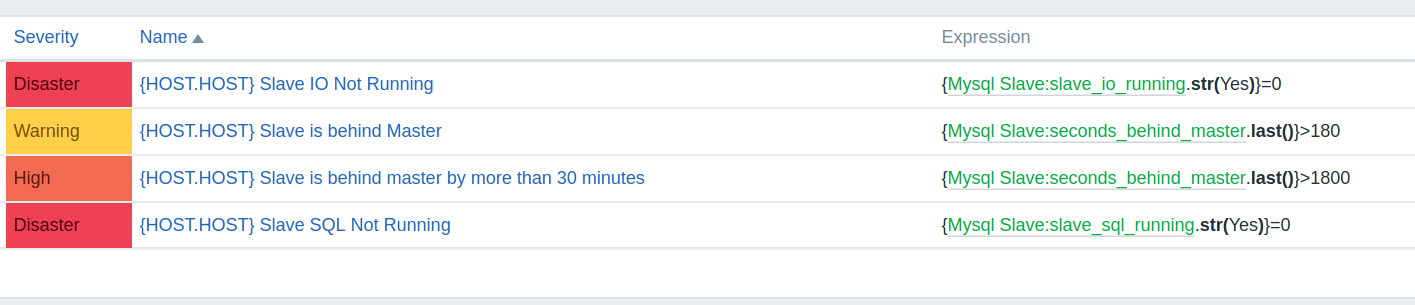
Mysql Slave Tempalte Triggers

Mysql Slave Template Graph


Monday, February 13, 2017

Generic ZuulFallbackProvider for Spring Cloud Netflix Zuul Proxy


Spring Cloud Netflix provides easy way of routing using Zuul proxy. It has a feature of circuit breaker in case of heavy load. Though underlying Hystrix provides a fallback, till recently Zuul didn't provide same. Zuul implemented this functionality in Camden SR2. Documentation for using Zuul Fallback is available here.

If you have multiple Zuul routes in your application, it will be cumbersome to write multiple fallback providers. GenericZuulFallbackProvider.java below can be used to provide a generic fallback  in your application.  Then you need to provide a bean for each route returning this generic fallback after setting route (and other fields like status code, response body etc).  Example of beans are available below in ZuulProxyApplication.java.

There is pending enhancement to provide default Zuul fallback. Below code might be still useful for cases where you need to override only some fields.

Wednesday, April 6, 2016

Migrating Zabbix 2.4.6 on sqlite to Zabbix 3.0 on mysql

Earlier, we set up Zabbix 2.4.6 with sqlite to just play around with it. But soon we started using it for monitoring various servers and applications. We were obviously aware that sqlite will not scale. We occasionally noticed database lock errors on UI. Finally, we decided to set up one with mysql for production grade scalability. Now, we loved the data we already had accumulated over couple of months. So, we migrated from sqlite to mysql and at same time also upgraded the zabbix version to 3.0. Here is how we did it. 

Steps:
  1. Export Sqlite DB: That was fairly simple using sqlite .dump command. It produced sql scripts with ddl and dml statements. 
  2. Massage SQL Script: Script created above was still a sqlite script and will not work for mysql. We needed to do following: 
    • Used this sed to convert sqlite to mysql. This worked for everything except changing AUTOINCREMENT to AUTO_INCREMENT as sqlite script didn't have CREATE TABLE and AUTOINCREMNET in same line. 
    • Used sed to change 'bigint' to 'bigint unsigned' as that is used by zabbix.
      sed -e "s/bigint/bigint unsigned/g"  zabbix.mysql.sql > zabbix_final.sql
    • Divided sql script into four parts as it was huge script. First one with all ‘INSERT INTO `history`’ statements. Second with all ‘INSERT INTO `history_uint`’. Third with all Indices and finally fourth with rest of statements. I used simple grep command.
  3. Execute SQL Scripts: We executed all scripts with autocommit turned off. And committed after every script.
    • First we executed fourth script as that had all ddl scripts for tables.
    • Then simultaneously scripts with inserts to history and history_uint table were executed. 
    • And finally all indices were created. Few indices failed for me with error - "specified key was too long; max key length is 767 bytes"
  4. Install and Upgrade: Install zabbix 3.0 as documented here, except part regarding executing mysql script. Start zabbix server. This will upgrade db too. Check for errors in zabbix server logs. If there is any sql related error, fix it manually and then restart zabbix server.
  5. Upgrade / Configure agents: Upgrade agents. This is not mandatory. But good to do. If zabbix server IP is changed, corresponding changes need to be done in agent configuration. Agents need to be restarted.
  6. Finally a Duhhhhhhhh: Blob in images table were not usable after migration. So, all rows from this table were deleted. All insert statements into images table were grepped from zabbix mysql 3.0 script and executed on this database. Not a big deal unless one has added any custom images. :)


Monday, April 4, 2016

Simple JsonPath in Python


Following python method is simplified jsonpath implementation that takes json object and jsonPath as input and returns json object at that json path as output.

For json array, we should use ".[element_num]". For example, from
    {"emp" : ["Indra", "Narada", "Yama"] }
to get "Narada", json path should be "emp.[1]". Remember, count starts with zero.

For objects with names that may vary, you may use "{object_number}". For example, from    
   {"machines": { "1a2d": { "os" : "Linux", "ram" : "16GB", "uptime" : "20045"}}}
if we need to get uptime,  json path can be "machines.{0}.uptime". But please ensure sequence of element in json is always fixed.

Friday, March 25, 2016

Python 3- Send Data to Zabbix Server

Following is method to send data to zabbix (2.4.6)  server written in python 3.

Corresponding Item key should be configured as zabbix trapper on zabbix server to successfully process this request.

Zabbix data is a json in following format.

{
  "request":"sender data",
  "data":[
     {
       "host":"hostName",
       "key":"key-1",
       "value":"200",
       "clock":1458748060
     },
     {
       "host":"hostName",
       "key":"key-4",
       "value":"test",
       "clock":1458748060}
     ]}
}

Wednesday, March 23, 2016

SQL Query- Where Value Between Two Columns

Imagine a simplified sample table that contains id, low_range, high_range. Low_range and High_range can be decimal ip address, zip codes or even timestamps.

id low_range high_range
1 400002 400120
5 407049 407340
5003 637190 637805
702984 849380 849875

We need to find row where a number is greater than low_range and lesser than high_range. Assumption is that maximum of one record and minimum of zero will be returned. 

SELECT id FROM table WHERE num > low_range AND num < high_range. 

The sql above might work well when we have probably few hundreds rows. But it is extremely slow with just few thousands records. Adding index on min_range (or / and max_range) will be helpful only for last few (or first few) records in index. For rest of rows, engine will consider a full table scan to be faster compared to using index. 

Solution 1:
SELECT id
FROM tab tab,
( SELECT max(low_range) as max_low_range
           FROM tab WHERE low_range <= num ) low_range_table
WHERE table.low_range = low_range_table.max_low_range
AND full_table.high_range >= num;
While above query might look complex to human, it makes life easier for database engine.   It first finds max low range available lesser than number. We have index on low_range; so this sub query will be fast. Next it joins with full table using this low_range. (Ideally, we should join with primary key). This will give exactly one row. Finally it validates if high range is still higher than number / string.

Explain plan:


Solution 2: 

          SELECT id
          FROM (
                    SELECT * FROM tab tab
                    WHERE low_range <= num
                     ORDER BY low_range DESC LIMIT 1) as max_low_range
          WHERE max_low_range.high_range >= num

Explain Plan


Thursday, December 10, 2015

Payment wallets in India - A to Z


Indian market is currently flooded with mobile wallet. Experts estimate mobile wallet market size of up to 19 billion USD by 2019. And everybody wants to get their bite. From telecoms to existing banks to business biggies to super charged startups, every body is launching mobile wallet. 

It is nightmare for businesses to integrate with these many wallets. With such high number of wallets, we will need another aggregrator that helps business to keep their life easy. How many mobile wallets does your business support? 

Following is list of semi open / semi closed wallets in India. (That I could mine out. I am sure I have missed plenty of them.)
  1. Airtel Money
  2. Axis Bank Lime
  3. Beam
  4. Chillr
  5. Citi Masterpass
  6. Citrus Pay
  7. Eko
  8. Etran Wallet
  9. Freecharge
  10. Hotremit
  11. ICash
  12. ItzCash
  13. Jio Money
  14. Mobikwik
  15. Mobomoney
  16. Momoe
  17. mPurse
  18. Nova Pay
  19. Obopay
  20. Ola Money
  21. Ongo
  22. Oxigen
  23. PayU
  24. Paytm
  25. Payzapp (HDFC)
  26. Pocket (ICICI)
  27. QuikWallet
  28. Smart Paisa
  29. Speed Pay
  30. Spice Mudra
  31. State Bank Buddy
  32. Tata mRupee
  33. Vodafone M-pesa
  34. X-Pay wallet
  35. YPayCash
  36. ZipCash

Wednesday, July 17, 2013

Google Form: Dynamically creating drop down list from a named range in Google Spreadsheet


I love using Google Form for collecting data and surveys. At times, I wish a feature, where inputs for Drop Down List, Checkbox or Multiple choice could be feed from excel sheet. This will help us when form itself is dependent on values from some other source.


We can achieve it with a simple google script. The script is executed from spreadsheet. It updates the Google form with a trigger set 'on change' on spreadsheet.

In below script, I take an existing google form and modify one of the drop down item in it. The values for this drop down item is fed from a named range in current active sheet.


Thursday, June 20, 2013

Obscuring data in database

At times, we may share database for development purpose. And we may need to obscure certain data. One example may be to obscure all email address in a particular table. Following sql statement obscures the local part of email address (before @ sign) and prefixes the domain name with two underscores (__).

update  Employeee_Table emp
set emp.email_id = concat(Translate(SUBSTR(emp.email_id, 1,  Instr(emp.email_id, '@')-1), 'ABCDEFGHIJKLMNOPQRSTUVWXYZabcdefghijklmnopqrstuvwxyz0123456789', '84cBF75ZKnbEHofTQRSs6etN9zrW03yUmIkvxVijwJOdl1uAhMqCD2pGLXgaPY'), replace((SUBSTR(emp.email_id, Instr(emp.email_id, '@'))),'@','@__'))


Translate function, available in both - IBM DB2 and Oracle, changes character by character. So, in above query all 'A's will be changed '8', 'B's to 4, 'C's to 'c', 'D's to 'B' and so on. Replace function replaces '@' with '@__'

You can randomize string for your use at http://textmechanic.com/String-Randomizer.html

Obscuring domain name would have made key more predictable. So, either we should choose to use different keys for local part and domain name or just obscure local part.

Prefixing '_' with domain name helps in avoiding any accidental email to be sent to correct domain name.

Also, this isn't any encryption and should not be used where security is important. This is just to obscure data. 

Monday, June 10, 2013

Calling an interactive bash script from another script

Lots of time we need to call existing scripts from new scripts. There are scripts which are interactive and have no option to avoid interactive mode by passing values inline as parameters. Some of them may just need a Yes or No while some may need important inputs in interactive mode.

Let us take a example (a bad one though). Suppose we need to call a script - stopMyServer.sh.

$./stopMyServer.sh
### Do you really want to stop Server? [Yes | No]
Yes
### Please enter the reason code to stop the server
### 1. Scheduled Downtime
### 2. Critical Patch
### 3. Performance degradation
1
### Thanks. Shutting down the server. ###
#!/bin/bash

echo Calling stopMyServer.sh

# EOF is meaningless and can be substituted by any word. Any 
# strings passed between the set of EOF (or any word used 
# instead of EOF) will be passed to interactive script. One 
# line for every interactive pause

./stopMyServer.sh <<EOF
Yes
1
EOF

echo stopMyServer.sh was called

Date Arithmetic in Unix Scripting


Unix has date function which is good to add or subtract days / time from current date but has lots of limitation. I found no easy way to do serious date-time arithmetic using it. One possible way is to convert date-time to seconds (since epoch) and then manipulate it.


#Assign a date to variable. 
startDateTime="2013-04-28 00:00:00"

#Converts date to epoch and assign it to variable. 
#One should be careful as it may accept it as date in only few predefined formats
startDateInSecs=`date -d "$StartDateTime" +"%s"`

#Perform manipulation by adding or subtracting time. 
#For example to add 2 hours
let newDateInSecs=$((StartDateInSecs + 2*3600))

#Then print or assign the date to a variable in required format.
NewDateTime=`date -d @"$newDateInSecs" +"%Y-%m-%d %H:%M:%S"`
echo NewDateTime

#Do note @ before variable $newDateInSecs. That shows date-time is in seconds since epoch

Friday, December 10, 2010

Getting authenticated programmatically in a form based authenticated webpage


Most of the websites have form based authentication. You must enter your credentials in a form to see your data. Did a hacker in you ever wished to log in this website through a script, so that you can download all your data or make changes or post some data to your account? Well, here is a simple way to achieve it using python.


import urllib, urllib2

# Create a opendirector instance to manage your cookie handlers
urlopener=urllib2.build_opener(urllib2.HTTPCookieProcessor())

# Let us add chrome user agent to header to fool the website. Some website may deny access to non browser user-agent.
urlopener.addheaders = [('User-agent','Mozilla/5.0 (X11; U; Linux i686; en-US) AppleWebKit/534.12 (KHTML, like Gecko) Chrome/9.0.576.0 Safari/534.12')]

# Let install the instance of opendirector
urllib2.install_opener(urlopener)

# Let us prepare the credentials. It may be important to find all possible hidden fields and fill it appropriately
credentials = {'email/userid':'yourUserId', 'password':'yourPassword', '_hiddenfield1' :'hiddenValue1', '_hiddenField2': 'hiddenValue2'}

# Let us post the urlencoded credentials to the credential check page (may or may not be same as login page)

# Note we are using installed urlopener to access this. This will automatically manage cookies
f=urlopener.open('http://secureWeb.site/login',urllib.urlencode(credentials))
s=f.read()

###### Process 's' - http response body as you want. ####
f.close()

# Access protected page with same urlopener
f=urlopener.open('http://secureWeb.site/ProtectedPage')
s=f.read()

##### Process 's' - http response body as you want. Check if you could really access protected page here #####
f.close()


I hope it helps and you enjoy accessing your favourite website through your script.


Wednesday, November 24, 2010

Posting on Twitpic from commanline


All of us like posting picture on twitter using twitpic. But most of us hate to go their website and do several clicks to reach upload page.  If you think similarly then here is command line method using curl to upload your pic. Linux, Unix and Mac users already have curl installed. Windows users must install curl utility to make this command work (or better switch to Ubuntu). 


Command -  
curl -F "username=TwitterUserId" --form-string "password=TwitterPassword" --form-string "message='MessageToTePosted'" -F "media=@yourPathToImage"  http://twitpic.com/api/uploadAndPost


where 
TwitterUserId is your Twitter User Id
TwitterPassword  is your Twitter Password
MessageToBePosted is message you want to post on twitter
yourPathToImage is path to the image

You can easily write a script to avoid typing this long command again and again. Also, if you want to upload multiple pictures at one time, writing a simple script might help.


Please note that twitpic uses http and not https for their api and thus your password might be at some risk. I wish they use https soon.


Sunday, November 7, 2010

Upload Workout to Dailymile


Dailymile.com is one of the premier website to share your training with your friends. They provide apis to build application. I wrote a small code to upload my runkeeper data to dailymile.com. And this is how I did.

  1. Register one application with dailymile.com as mentioned at http://www.dailymile.com/api/consumers/new.
  2. Get access token as documented at http://www.dailymile.com/api/documentation/oauth.
  3. Write a small code like following to extract data from a csv file and post it to dailymile.com using REST APIs as documented at http://www.dailymile.com/api/documentation

#!/usr/bin/python
from datetime import datetime, date, time
import httplib, urllib, string, datetime, sys


csvFile = open("test.csv", 'r')
for line in csvFile.readlines():
stringTokens = line.split(',')
timeTokens = stringTokens[4].split(':')
timetaken=(int(timeTokens[0])*60+int(timeTokens[1]))*60+int(timeTokens[2])
actDat = datetime.datetime.strptime(stringTokens[1], "%m-%d-%Y %H:%M:%S").strftime("%Y-%m-%d %H:%M:%S")
para = '{"oauth_token":"<Your Auth Code Goes here>", "message": "'+stringTokens[7].strip() + '", "workout": {"activity_type":"'+ string.lower(stringTokens[2]).strip() + '", "distance": {"value": ' + stringTokens[3] + ', "units":"kilometers"}, "duration": '+ str(timetaken) + ', "title":"' + stringTokens[1].strip() + '", "completed_at":"' + actDat +'" }}'
print para
headers = {"Accept": "application/json", "Content-type": "application/json"}


conn=httplib.HTTPSConnection("api.dailymile.com")
conn.request("POST","/entries.json", para, headers)
r1=conn.getresponse()
print r1.status, r1.reason
print r1.read()
conn.close()

If you find any problem / bug / issue, please let me know. I will be glad to help.  Please feel free to mail me at tachniki@gmail.com

Saturday, November 6, 2010

Exporting Runkeeper Data


Runkeeper.com is one of the most well known website for tracking one's running, cycling etc. They have a wonderful website with charts and lots of interesting features. But as I mentioned here, I needed to export data from runkeeper and that is when I wrote a python script to download runkeeper data which I can import to dailymile.com.


If you need to export your data from runkeeper.com, you may use it too. This code comes with absolutely zero warranty. You may use it for your personal use. You can download  this script (runkeeper.py) from here.


This script can be executed by using following command
            ./runkeeper.py runkeeperUserId filename.csv
where runkeeperuserId is your Runkeeper User Id and filename is any name of any file where you want to store your activities.


Update December 10th 2010: 
----------------------------------------------------------------------------------
Now you can even download your private activities (along with your public activities) with a new script. You can download this script (runkeeper_wPrivAct.py) from here. 


This script can be executed by using following command
            ./runkeeper_wPrivAct.py emailId filename.csv
where emailId is your email id associated to runkeeper and filename is name of any file where you want to store your activities.


You will need to enter your runkeeper password when asked for. Please note that entering email id and password is as safe as entering on runkeeper website. This script doesn't store or send your password anywhere except using it to log you onto runkeeper website to download your data.. 
--------------------------------------------------------------------------------


These script will produce a comma separated text file in following format:


If you find any problem / bug / issue, please let me know. I will be glad to help.  Please feel free to mail me at tachniki@gmail.com